Space Waves Controls: How the Wave Arrow Really Moves
Published · 3 min read
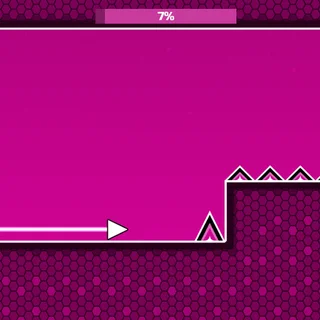
Space Waves is a one-input game. Hold the left mouse button, W, Space or the Up arrow and the arrow climbs; let go and it falls. On a phone you hold the screen instead. The tutorial teaches it in two steps — first "hold for 3", then "press several times" — and those two exercises are, in fact, the whole skill. Here is what is going on underneath and how to use it.
Two straight lines, not a curve
Most one-button games give you an arc: a flap that rises and then sags, a jump that goes up and comes down. Space Waves does not. While you hold, the arrow moves up and to the right at a fixed angle. When you release, it moves down and to the right at the same angle. There is no acceleration and no float at the top. That is why the trail it leaves is a clean zig-zag of straight lines.
The good news is that the arrow is completely predictable. If you know where it is now and how long you will hold, you know exactly where it will be. The hard part is that there is no forgiveness either: a press that is a fraction late is a line that ends in a spike.
Long holds and short taps
Because the angle never changes, the size of the zig-zag is set by how long each hold and each release lasts.
- Long holds make big swings. They cover a lot of height and are right for open rooms where the next gap is far above or below you.
- Short, even taps make a tight wiggle that stays near one height. This is the move for narrow corridors. Tap-release-tap-release at a steady beat and the arrow runs almost flat through the middle.
The "press several times" part of the tutorial is there to teach the second one. Most crashes in the early worlds come from players using long holds in places that need short taps.
Sliding on the ceiling and the floor
The tutorial says it plainly: hold to fly up or slide on the ceiling. If you keep holding when the arrow reaches a flat ceiling, it does not crash — it slides along it. Release while it is on the floor and it slides along the floor. As long as there is no spike on that surface, a wall is a safe place to wait.
This changes how you read a level. When a gap opens near the ceiling a little way ahead, you do not have to time a perfect diagonal into it. Climb early, sit on the ceiling and let go only when you need to drop. The same works in reverse on the floor.
Reading a level
- Look a screen ahead. The arrow only goes right, so the useful information is always in front of it.
- Find the openings first, the spikes second. Your job is to be at the right height when the opening arrives. Plan the route, then fit the taps to it.
- Watch moving parts once. Saw blades and moving blocks repeat. One cycle of watching is cheaper than three crashes.
- Use the percentage bar. In Classic the bar at the top shows how far through the level you got. Note where you died and give that section your full attention next run.
Which key to use
All four inputs do the same thing, but they do not feel the same.
- Space or W on a laptop is the most comfortable for long sessions; your hand rests on the keyboard.
- The mouse button is very precise for short taps.
- A trackpad tap can lag on some Chromebooks while the pad decides whether you meant a drag. Press the pad down properly, or use Space.
- Touch works well in landscape; keep your thumb low so it does not cover the arrow.
Whatever you choose, keep it. Changing inputs halfway through a level resets the rhythm you have been building.
When the keys do nothing
If Space or W does nothing, the page has the keyboard instead of the game. Click once inside the game and try again. P pauses a level, and the pause button in the corner does the same.
The short version
Big holds in open space, short even taps in tight corridors, and the walls are your friends when they have no spikes on them. Learn those three habits on World 1 and the rest of Space Waves becomes a question of reading the level, not fighting the controls.
More from the blog
- Space Waves Modes: Classic, Endless and Race Explained
What each of the three modes on the Space Waves menu asks of you, how the worlds are laid out, and what gems, arrows, trails and colours are for.